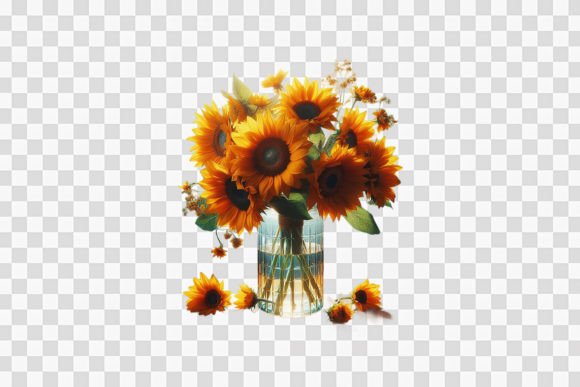
Composition with Sunflowers in a Vase
A well-made sunflower composition can carry warmth, optimism, and a visual brightness that few other subjects match. The combination of sunflowers in a vase offers a classic still-life motif, but when rendered as a transparent-background digital file, it becomes something far more flexible. This approach strips away the stage and leaves the subject ready to work in almost any context. Whether you are designing for print-on-demand products, building a brand visual, or looking for a reliable graphic element, a composition with sunflowers in a vase can serve you better than you might expect.
What makes a sunflower composition versatile
Sunflowers themselves have a natural advantage. Their broad faces, warm yellows, and sturdy stems translate well across media. When placed in a vase, the arrangement gains structure and balance without feeling stiff. The vase grounds the flowers, while the stems and leaves create lines that guide the eye upward. This kind of composition works equally well in a square format, a vertical layout, or as a stand-alone element.
The transparent background is the real game-changer. It removes the need to cut out or mask the image later. You place the sunflower group directly onto a background of your choosing, and it sits naturally, as if it were always part of the layout. This saves time and reduces the risk of visible edges or awkward transitions. For anyone working on multiple products or assets, this detail alone makes the file far more practical than a traditional layered image.
Creative applications across different fields
A composition like this does not belong to one type of creator. Its uses cut across several disciplines, and each user benefits from the same core assets in a slightly different way.
Print-on-demand and product designers
For those running a print-on-demand shop, reusable assets are essential. A high-resolution sunflower composition in a vase can appear on mugs, tote bags, greeting cards, signs, and postcards without requiring a new layout every time. Because the file comes as both a PNG and a PSD at 300 dpi, you can scale, recolor, or reposition elements within the design. The 4,000 by 4,000 pixel size ensures that even large prints on apparel or home decor stay crisp.
If you sell on platforms like Redbubble, Society6, or Printful, having a versatile sunflower design ready to adapt means you can test different products quickly. Try it as a centered motif on a ceramic mug, then place it off-center on a tote bag for a more relaxed composition. The transparent background keeps the editing process clean.
Graphic designers and marketing professionals
In marketing collateral, a flower arrangement can soften a layout or add a human touch without overwhelming the message. Sunflowers especially associate with positivity, growth, and natural themes. A composition with sunflowers in a vase can serve as a background accent in a brochure, a hero image on a landing page, or a repeating pattern element on social media graphics.
Because the file includes a PSD layer, you can adjust individual components. Maybe you want to desaturate the background vase slightly so that text placed over it remains readable. Maybe you want to duplicate the vase and create a mirrored effect for a header banner. The layered file gives you room to make those changes without rebuilding the composition from scratch.
Educators and content creators
For bloggers, course creators, and educators, visual consistency matters. A sunflower composition can function as a recurring visual anchor across a series of posts, worksheets, or presentation slides. If you are teaching a lesson about color theory, composition, or botanical illustration, this image provides a ready example. You can break it apart in editing software to show individual elements, or keep it whole as a case study in balanced arrangement.
Content creators covering lifestyle, creativity, or home decor will also find it useful. It can sit behind text in a quote card, appear as a chapter divider in an e-book, or become the central image in a printable planner page.
Practical ways to keep your designs clear and effective
Working with a pre-made composition does not mean you sacrifice originality. The key is to make intentional choices about how the image interacts with its final environment.
- Mind the background contrast. On a white or light pastel background, the yellow petals stand out naturally. On a darker background, consider adding a soft shadow or glow behind the vase to separate it from the surface. Even a subtle drop shadow in your editing software can make the arrangement feel grounded.
- Respect the scale. At 4,000 by 4,000 pixels, you have room to enlarge the composition significantly without quality loss. But if you shrink it too much for a small product like a sticker, the fine details in the petals and leaves may become muddy. Test the size at actual print dimensions before finalizing.
- Use the PSD for color adjustments. If your brand palette leans toward cooler tones, you can shift the yellows into a more muted golden range or desaturate the greens in the stems and leaves. The layered file lets you do this selectively rather than affecting the whole image.
- Keep the format consistent. If you use this composition across multiple products, try to maintain a consistent placement and size. That repetition builds visual recognition with your audience. A customer who buys a sunflower mug one week will more easily identify a sunflower notebook from the same shop if the composition appears in a similar position.
Adapting the composition for different audiences and platforms
Different audiences respond to different stylistic cues. The same sunflower arrangement can look rustic, modern, elegant, or playful depending on how you frame it.
For a younger audience on social media, pair the composition with bold typography and a flat, bright background. The transparency makes it easy to drop onto a gradient or a patterned surface. For a more refined audience, such as those looking at home decor or stationery, place the vase against a neutral linen texture or a soft off-white background. The sunflower arrangement itself stays the same, but the context changes the tone.
If you are designing for a campaign that involves giving prints or cards as gifts, consider adding a simple border around the composition to make it feel finished. A thin black or gold line around the edge of a greeting card gives the sunflower arrangement a polished frame without competing with it.
Working with custom design options
Sometimes the pre-made composition gets you 90 percent of the way, but you need a specific adjustment for a client or a product line. The option to order a custom design based on this style can bridge that gap. If you need a different color palette, a different vase shape, or additional elements like butterflies or text, working directly with a designer who understands the original file ensures consistency. You are not starting over. You are building on an existing visual language.
This is particularly useful for print-on-demand store owners who want to differentiate their catalog. If you use the same base composition as ten other sellers but customize the colors and layout, your versions become distinct. Customers notice those details, even if they cannot articulate exactly what is different.
When requesting a custom design, be specific about the intended use. Mention the product dimensions, the dominant colors of your brand, and whether you need the file as a PNG, PSD, or both. The more context you give, the more precisely the designer can adapt the composition to your needs.
Quality considerations for print and digital use
The provided file specifications matter more than most users realize. A 300 dpi PNG at 4,000 pixels square meets professional print standards for most applications. Sublimation printing, in particular, benefits from this resolution because the transfer process can soften fine details. Starting with a sharp, high-resolution file helps the final product retain its clarity.
For digital use, such as website banners or social media posts, you can safely downsample the image to 72 or 150 dpi without losing visible quality on screens. Keep the original file saved separately so you always have the high-resolution version available when you need to produce physical items.
Transparent backgrounds require proper handling in your editing software. Make sure your canvas supports transparency and that you export in a format that preserves it. PNG is the standard for most use cases, but if you are working in a vector-based layout, you may want to place the PSD directly into your document to maintain editability.
Bringing the composition into your own workflow
The real value of a composition like this is not just in the image itself but in how it fits into your existing process. If you frequently create mockups, having a transparent-background sunflower arrangement means you can drop it into a scene without rebuilding the lighting or shadows each time. If you run multiple shops or handle designs for several clients, the file acts as a reliable asset that you can pull from repeatedly
To make the most of it, organize your files clearly. Keep the PNG and PSD together in a folder labeled with the composition name and resolution. If you make custom versions, save them with distinct filenames so you do not accidentally overwrite the original. A small habit like this prevents unnecessary rework later.
You can also combine this composition with other elements to create more complex scenes. Pair it with a window frame, a tabletop, or a textured wall photo to build a full still-life environment. The transparent background lets you layer elements without visible clipping, which opens up more creative combinations than a single flat image would allow.
Sunflowers in a vase may be a classic subject, but the way you use it determines whether it feels familiar or fresh. With the right file in hand and a clear sense of where you want it to appear, you can adapt this composition to support a wide range of creative and commercial goals.