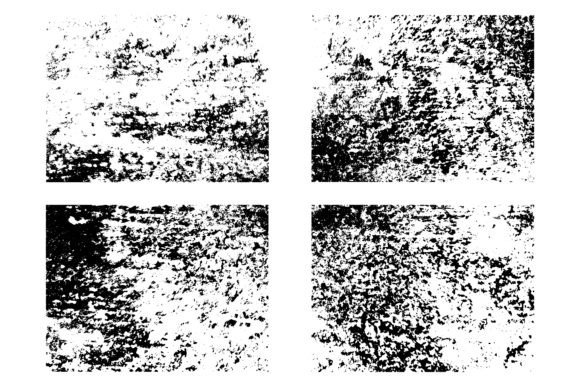
Black and White Grunge: The Power of Abstract Texture in Modern Design
There is something compelling about an old painted wall. The cracks, the peeling layers, the dust that has settled into every tiny crevice — it tells a story. In the world of digital design, capturing that raw, imperfect energy is exactly what abstract texture brings to the table. Whether you are building a gritty poster, a moody website background, or a branding kit that feels aged and authentic, black and white grunge textures offer a visual vocabulary that polished, sterile graphics simply cannot match.
The demand for distress overlay textures has grown steadily over the past decade. Designers, illustrators, and content creators have realised that perfection is not always the goal. Sometimes you want your work to feel touched by time, weathered by use, or marked by the environment. That is where abstract texture steps in — not as a gimmick, but as a foundational tool for adding depth, emotion, and tactile realism to flat digital canvases.
What Makes Black and White Grunge So Effective
Black and white grunge textures strip away colour distraction and let the raw form and contrast do the heavy lifting. Without colour, the eye focuses on shape, density, grain, and the distribution of wear. A rough dirty wall background concept, for example, relies entirely on the interplay between light and shadow, density and emptiness, smooth and rough. This monochromatic approach makes these textures incredibly versatile. They can be multiplied, screened, overlaid, or blended into almost any project without clashing with an existing colour palette.
When you work with an abstract texture that mimics an old painted wall, you are working with layers of history. The paint has cracked in patterns that feel organic. The dust has gathered in ways that no algorithm can perfectly replicate. The surface grain carries the memory of weather, touch, and time. These qualities give your design a sense of place and materiality that is hard to achieve through vector shapes or synthetic filters alone.
The Role of Distress Overlay Texture in Compositions
A distress overlay texture functions much like a physical filter placed over a photograph or illustration. It introduces imperfections — scratches, scuffs, dust specks, and uneven wear — that disrupt the clean, machine-perfect look of digital work. For designers working in editorial layout, album art, or brand identity, this is often exactly what is needed to make a piece feel grounded and human.
Consider a poster for a live music event. Without texture, the typography and imagery sit cleanly on the page, but they lack atmosphere. Add a distress overlay texture — especially one derived from an abstract texture source like a grainy wall or dusty surface — and suddenly the poster breathes. The overlay introduces subtle variation across the entire piece. Some areas become darker and heavier, others fade and recede. The viewer's eye moves differently across the composition, pulled by the natural unevenness of the texture.
This is not about making things look old for the sake of it. It is about introducing visual interest and directing attention through controlled imperfection. A well-chosen distress overlay texture can make a flat background feel deep, make a logo feel stamped onto a surface, or make a photograph feel like a found image from another era.
Abstract Surface Dust and the Illusion of Tactility
One of the most overlooked aspects of digital design is tactility — the illusion that you could reach out and touch the surface. Abstract surface dust plays a huge role in creating that illusion. When you see fine particles scattered across a background, your brain registers them as evidence of a real physical space. A rough dirty wall background concept becomes believable because of the tiny specks, the uneven clustering, and the way dust settles into corners and edges.
An abstract texture file that captures this level of detail is incredibly valuable for designers who work in mockups, environmental branding, or packaging. Imagine designing a label for a craft spirit. You want the label to feel like it belongs on a bottle that has sat in a rustic cellar. The paper should look slightly worn, the printing should feel imperfect, and the background should carry the grain of aged stock. A black and white grunge texture, applied as an overlay, can deliver all of that in one layered file.
The same principle applies to web design. While flat design has its place, more and more digital products are incorporating subtle texture to distinguish themselves. A grainy background, derived from an abstract texture source, adds warmth and depth to a landing page without increasing load time significantly. When the texture is black and white, it remains neutral and professional, yet it carries a visual richness that a solid colour block cannot provide.
Why a Single EPS File Matters
Receiving a single EPS file that contains a high-quality abstract texture is often more useful than a dozen different files with varying formats. EPS is a vector format, which means the texture can be scaled infinitely without losing resolution. Whether you need the texture for a small social media graphic or a massive billboard, the EPS file will maintain its sharpness and integrity. For designers who work across print and digital, this flexibility is essential.
Furthermore, an EPS file allows you to easily adjust the texture within vector editing software. You can change the contrast, invert the values, adjust the density, or combine it with other elements without degrading the original. This level of control is especially important when you are working with an abstract texture that contains fine details like dust specks or crack patterns. In a raster format, those details might become pixelated or lost during scaling. In EPS, they remain crisp and editable.
The file you receive will contain one complete abstract texture — a fully realised black and white grunge surface that you can drop directly into your workflow. This eliminates the need to hunt for multiple texture sources or composite different elements together. One file, one seamless texture, ready to be used as a distress overlay, background, or blending element.
Practical Applications Across Industries
The use of black and white grunge and distress overlay textures spans a wide range of creative fields. It is not limited to one style or one type of project.
- Print design: Flyers, posters, zines, and book covers benefit greatly from the addition of surface texture. A grainy background can make a print piece feel like it was produced on a risograph or letterpress, even if it was designed entirely digitally.
- Branding and identity: Brands that want to convey authenticity, heritage, or a handcrafted quality often incorporate abstract surface dust into their visual language. This is common in the craft food, beverage, and apparel sectors.
- Web and UI design: Subtle texture overlays are increasingly used in hero sections, card backgrounds, and even button states to add a layer of depth that users can feel subconsciously.
- Photography and compositing: Photographers use distress overlay textures to age images, add atmosphere, or match the grain between different source images in a composite.
- Motion graphics: Animated textures derived from an abstract texture source can be used to create organic, shifting backgrounds that feel alive and unpredictable.
Each of these applications relies on the same core qualities: the texture must be high-resolution, scalable, and natural-looking. A synthetic or obviously generated texture will break the illusion. That is why textures based on real surfaces — old painted walls, dusty concrete, worn metal — remain the gold standard. They carry the authentic irregularities that only real-world wear can produce.
What to Look for in an Abstract Texture File
Not all texture files are created equal. When you are choosing an abstract texture for your work, there are several factors worth considering.
- Resolution and scalability: Even within an EPS file, the underlying detail must be captured at a high enough quality to hold up at large sizes. Look for textures that were scanned or photographed at high resolution before being converted to vector.
- Contrast range: A good black and white grunge texture should have a wide tonal range. It should include pure white, deep black, and plenty of midtones. This gives you maximum flexibility when blending or adjusting.
- Organic distribution: The dust, cracks, and wear should look natural. Avoid textures that have repeating patterns, obvious tiling, or unnatural uniformity. True abstract texture comes from irregular, unpredictable sources.
- Ease of use: The file should be ready to drop into your software of choice. No complex setup, no multiple layers to sort through. One clean EPS file that works immediately.
When you have a file that meets these criteria, you can use it across an entire project without ever needing to search for another texture. It becomes a foundational asset that you return to again and again.
Blending Texture into Your Workflow
Incorporating an abstract texture into your design does not have to be complicated. Most designers start by placing the texture as an overlay layer above their main artwork. In Adobe Illustrator, Photoshop, or Affinity Designer, you can set the blend mode to Multiply, Overlay, Soft Light, or Screen depending on the effect you want. Multiply is excellent for adding grunge and darkness to a background. Overlay and Soft Light allow the texture to interact more subtly with the colours beneath.
You can also mask out parts of the texture so that it only affects certain areas. For example, you might want the full distress overlay texture on the background of a poster but keep the central subject cleaner and more readable. A simple layer mask lets you paint out the texture where it is not needed, keeping your composition balanced.
Another approach is to use the texture as a clipping mask or as a fill within type. This works especially well for headlines or logotypes where you want the text to feel like it has been printed onto a rough surface. The abstract texture fills the letters with dust, grain, and wear, making the typography feel embedded in the environment rather than floating on top of it.
For photographers, the same EPS file can be applied as a subtle grain overlay to unify a series of images. This is particularly useful when you are combining photos taken under different lighting conditions or with different cameras. A consistent grainy background texture applied across all images creates a cohesive visual language that ties the set together.
Recommendations for Getting the Most Out of Your Texture
Start by using the texture at full opacity to see the full range of detail. Then reduce the opacity or adjust the blend mode to find the sweet spot for your specific project. Sometimes a very faint texture — say, 10 to 20 percent opacity — is all you need to give a surface subtle character. Other times, a heavy, high-contrast overlay is exactly what the composition calls for. The EPS format gives you the freedom to experiment without compromising the original file.
It is also worth experimenting with rotating or flipping the texture. Many abstract texture files have a natural directionality — the cracks run a certain way, the dust settles in one orientation. Changing the angle can give you a completely different look from the same file, extending its usefulness across multiple projects.
Finally, consider combining the texture with colour overlays. Even though the texture itself is black and white, you can place a colour layer above it and use a blend mode to tint the grunge. This allows you to adapt a single abstract texture file to match any colour scheme, making it one of the most versatile assets in your toolkit.
Whether you are designing for print, web, or motion, the combination of black and white grunge, distress overlay texture, and abstract surface dust offers an unparalleled way to bring authenticity and depth to your work. One EPS file, built from real-world surface character, can transform a flat design into something that feels lived in, touched, and real. That is the enduring power of a well-crafted abstract texture.