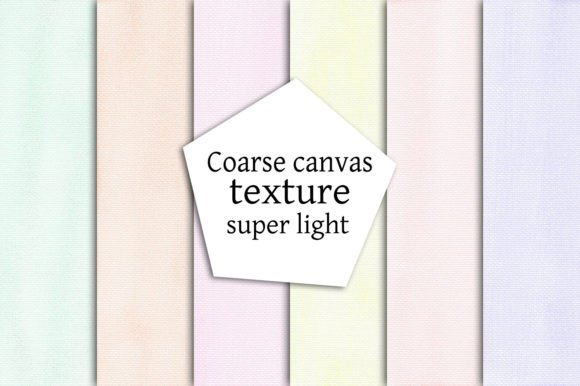
Coarse Canvas Texture Super Light Set: Bringing Tactile Depth to Paper Crafting Projects
When you are building something by hand, texture matters. It is not just about how a project looks when it is finished, but how it feels in the hands of the person holding it. Whether you are assembling a handmade journal, designing a set of wedding invitations, or creating branded tags for a small business, the surface of the paper sets the tone for the entire piece. The Coarse Canvas Texture Super Light Set gives you a way to introduce that tactile quality without adding visual weight or overwhelming the content you place on top.
This set includes six high-resolution JPG files at 300 DPI, each measuring 3333 x 3333 pixels, delivered in a single zipped archive. The texture itself mimics the appearance and feel of a light canvas weave, but with a subtle hand that keeps it from competing with text, illustrations, or photographs. It is a practical resource for anyone who works with paper, whether you are a hobbyist working at a kitchen table or a small business owner producing printed materials at home.
What the Coarse Canvas Texture Super Light Set Offers in Practice
Understanding what you are working with is the first step toward using it effectively. Each file in this set is a seamless tile, meaning you can apply it across a large surface area without visible seams or repeating patterns that break the illusion of a natural canvas surface. The resolution is generous enough to allow for scaling, so you are not locked into one specific print size. At 3333 pixels per side, you can print at a variety of dimensions while maintaining clarity.
The designation "super light" is important. Many canvas textures lean heavy, with deep shadows and pronounced weave lines that can make text difficult to read or overwhelm delicate design elements. This set keeps the texture present but restrained. You get the visual interest of canvas grain without the distraction. For professionals and creators who need consistency across a series of projects, this means you can apply the texture as a background layer and still layer type, graphics, or illustrations on top without losing legibility.
The 300 DPI standard matches typical print requirements, so there is no need to upscale or interpolate. What you see in the file is what you get on paper, provided your printer and paper stock are properly calibrated. This matters when you are producing items that need to look consistent across multiple copies, such as save-the-date cards, product tags, or menu inserts.
Applying the Texture in Common Paper Craft Workflows
The value of a resource like this becomes clear when you consider how it fits into an actual project workflow. Below are several use cases organized by the typical sequence of decisions and actions involved in preparing, producing, and finishing paper-based items.
Preparing Backgrounds for Notebooks and Journals
When you assemble a notebook or journal by hand, the cover and endpapers often need more visual interest than a plain sheet of cardstock can provide. You might print the canvas texture onto a heavier paper stock and use it as a cover wrap, or apply it to the inside covers for a subtle tactile transition between the hardcover and the pages. Because the texture is light, it works well under stamped or foiled titles. If you plan to add a title panel or label, the weave will show through slightly, giving the finished piece a handmade, artisanal feel without looking unfinished.
For productivity-minded users who make their own planners or bullet journals, this texture can be printed onto divider pages or section tabs. The slight roughness of the visual helps signal a new section without requiring a full-page graphic. It is a minimalist approach that relies on material quality rather than decorative clutter.
Greeting Cards and Invitations
In the stationery world, texture is often associated with premium pricing. A thick, textured card communicates quality before the recipient even reads the message. The Coarse Canvas Texture Super Light Set allows you to simulate that effect on standard cardstock you already have in your workspace. By printing the texture onto the card blank, you elevate the base material without increasing your per-unit cost significantly.
For invitations, especially for events like weddings, baby showers, or milestone birthdays, the subtle canvas grain works well with both serif and sans-serif typography. It also accepts inkjet and laser printing reliably because the texture pattern is continuous and does not interfere with toner adhesion. If you are also adding embellishments such as ribbon, wax seals, or dried flowers, the canvas background acts as a neutral anchor that does not compete with those three-dimensional elements.
Tags and Labels for Small Business
If you run a small business selling physical goods, the tags and labels you attach to your products are a direct extension of your brand. They need to look intentional and cohesive. Printing your product information onto a canvas-textured background suggests a handmade or natural product, which is valuable if you sell candles, soaps, apparel, or packaged food items.
Because the texture is light, barcodes, ingredient lists, and care instructions remain fully readable. This is a practical consideration that often gets overlooked in the excitement of designing a pretty label. The 3333 x 3333 pixel dimensions give you enough resolution to print multiple tags on a single sheet, which helps with batch production efficiency. You can load the texture into your design software, place your text and graphics, and then print onto adhesive paper or cardstock for cutting.
Scrapbooking and Photo Albums
Scrapbooking requires a balance between visual layers and legibility of the narrative elements. A canvas texture can serve as a unifying background for an entire spread. Since the texture is super light, it does not pull attention away from the photographs, which should remain the focal point. Use it as a full-page background for journaling blocks, or cut it into strips to use as borders or matting layers.
For photo albums, you can print the texture onto the album pages before inserting photographs. This gives the album a cohesive look without requiring a patterned paper purchase for every page. Over time, if you produce multiple albums, using the same texture set creates a consistent visual language across your work.
Bookmarks, Menus, and Decorative Boxes
Bookmarks are a quick project that benefit from a textured surface because they are handled frequently. The canvas grain adds grip, making the bookmark less likely to slip out of a book. Print the texture onto lightweight cardstock, laminate if desired, and cut to size.
Menus, whether for a home gathering or a small event, benefit from texture because it makes the printed piece feel substantial even if it is disposable. A canvas-textured menu printed on quality paper stock elevates the dining experience without requiring expensive letterpress or embossing services.
For decorative boxes, such as the kind used to package gifts or store small items, you can print the texture onto adhesive paper and apply it to the exterior of a plain cardboard box. This transforms a functional container into a decorative object. The seamless nature of the texture files ensures that the pattern wraps around the box without awkward jumps or mismatched weave lines.
Implementation Tips for Consistent Results
Getting reliable results from this texture set depends on a few factors that are easy to control once you are aware of them.
First, check your printer settings before running the final batch. Even though the texture is light, some printers will darken the grain slightly due to their default color profiles. Print a test square on the exact paper stock you plan to use for the project. Adjust brightness or contrast in your design software if needed. Saving the adjusted file as a project-specific version can save time if you need to reprint later.
Second, consider the paper weight. Because the texture is purely visual, the actual paper you print on determines the finished feel. For a convincing canvas hand, use a matte cardstock or a textured art paper. Avoid glossy or coated papers, as they will reflect light in a way that competes with the canvas grain and reduces the illusion of texture.
Third, when using the texture in digital templates for repeat projects, set up your design file with the texture layer locked at the bottom of the stack. This ensures that all future elements you add remain above the texture, making it easy to produce consistent pieces across multiple design iterations. If you are making tags or labels with variable data, such as event dates or product names, keep the texture layer separate from your text and graphics layers. This allows you to swap out the content without touching the background.
Fourth, think about file organization. The six files in the set give you variety. Name them clearly in your asset library by their visual characteristics, not just a file number. For example, note which ones have a more open weave versus a tighter grain. This small habit saves time when you are in the middle of a deadline and need to match a previous print run.
Integrating the Set Into a Broader Creative Workflow
This texture set works best when it is treated as a foundational resource, not a one-off element. If you produce multiple types of paper goods, having a consistent texture across your product line builds brand recognition. A customer who buys a gift tag from you and later receives a card or a journal will notice the consistent material quality, even if they cannot articulate why the pieces feel connected.
For educators and bloggers who create printable resources, this texture can be used as a subtle background for worksheets, guides, or planning pages. It adds a premium feel without interfering with the usability of the document. Just ensure that the print-on-demand service you use, if any, supports high-resolution JPG uploads and will render the texture accurately.
Collaboration is another area where this set shines. If you work with a print partner or a production assistant, you can share the texture file directly. Because it is a standard JPG at 300 DPI, there are no compatibility issues across different software ecosystems. It opens in Photoshop, Illustrator, Affinity, Canva, Procreate, or any basic image editor. This lowers the friction when transferring files between team members or between your design stage and your production stage.
Long-Term Use and Quality Control
Over months and years of use, you will develop preferences for which of the six files works best for specific applications. Keep a physical reference sheet printed on your most common paper stock, with each texture variation labeled. This eliminates guesswork when you are under time pressure. Also, note the printer and paper combination that gave you the best result, so you can replicate it reliably.
The texture itself is timeless. It does not rely on seasonal trends or Color of the Year themes. That makes it a sustainable resource for a small business or a personal creative practice. You can use it across holiday products, everyday items, and special editions without worrying about your designs looking dated.
If you ever need to scale a project, such as producing 200 menus for an event or 500 tags for a product launch, the predictability of this texture set is a practical advantage. You know exactly how it will print, how it will look on the paper, and how it will behave under different lighting conditions. That kind of consistency reduces waste and rework, which is essential when margins are tight or deadlines are fixed.
The Coarse Canvas Texture Super Light Set is a focused tool for a specific need, and that is precisely what makes it valuable. It does not try to be everything. Instead, it provides one quality texture, executed well, at a resolution and format that fits directly into production workflows. Whether you are making a single handmade gift or a batch of branded materials, it gives you a reliable starting point for creating paper goods that look and feel intentional.