Digital Memorial Day Invitations for Modern Hosts
Memorial Day marks the threshold of summer. It’s a weekend that balances sincere remembrance with the joy of gathering. If you are organizing the backyard barbecue, coordinating a beach trip, or planning a neighborhood potluck, the way you invite people sets the tone for the entire event. A sprawling group text often feels too casual and disjointed. A physical card, while thoughtful, requires time, postage, and patience that many hosts simply don’t have.
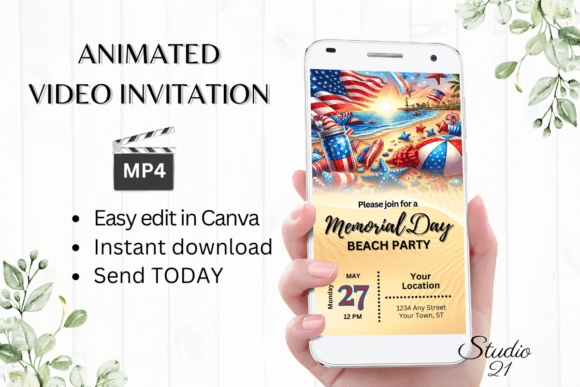
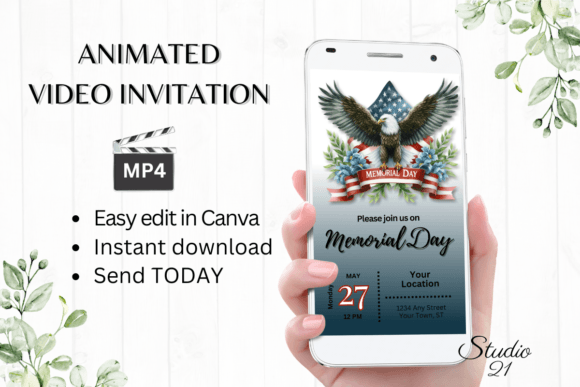
A Digital Memorial Day Invitation bridges this gap perfectly. It is immediate, visually engaging, and deeply personal. More than just a static image, the animated video template transforms a simple message into a cinematic opener for your holiday weekend. It says to your guests, “This matters enough to me to create something proper,” without costing you hours of design work or a trip to the print shop.
Why Digital Invites Elevate Your Holiday Weekend
The shift from print to digital isn’t just about convenience; it is about connection. An animated video invitation captures attention in a way that a static piece of paper or a text wall cannot. When your invitation arrives as an MP4 file, it stops the scroll. It creates a moment of delight before the recipient even reads the details.
For a holiday like Memorial Day, where plans are often fluid and dependent on weather or group coordination, a digital format gives you unmatched flexibility. You can update the time, adjust the rsvp link, or change the location without needing to reprint and remail. The template you get is live, editable, and ready to share instantly across text, email, or social channels.
What You Actually Get: A Toolkit for Fast, Professional Design
Understanding exactly what you are working with is the first step to using it effectively. This is not a single-use graphic. It is a full editing system built inside Canva, one of the most accessible design platforms available today.
- Immediate Access via PDF: The download delivers a PDF containing the direct link to your template. There is no waiting for a separate email, no license key to activate, and no large file to download. You click the link and enter Canva within seconds.
- Perfect Mobile Dimensions (1080 x 1920 px): The template is built for the screen your guests are using most. Whether it arrives via iMessage, WhatsApp, or Facebook Messenger, the vertical format fills the phone screen beautifully, with no awkward cropping or letterboxing.
- Complete Customization Suite: You can change every piece of text, swap the font style, adjust colors to match your decor or brand, and even modify the animation style. The template is your starting point, not your final boxed-in design.
- User Guide Included: The guide provides specific instructions for editing, exporting as an MP4, and sharing across different platforms. It removes guesswork so you can focus on the personalization.
- No Software or Fonts to Download: Everything happens in the browser or the Canva mobile app. No hunting for the right typeface or dealing with software conflicts. This is frictionless design, built for the busy host.
Creative Directions for Your Memorial Day Invitation
The template is versatile by design. Depending on the tone of your gathering, you can push the visual style in completely different directions using the existing tools within Canva.
The Classic All-American Cookout
Lean into the traditional palette of navy blue, crisp white, and vermillion red. Use the text editing tools to layer these colors across the invitation. Keep the animation bold and direct—a gentle wave on the background or a fade-in for the event details. This style works perfectly for backyard barbecues, family reunions, and block parties where the focus is on tradition and togetherness.
The Reflective and Respectful Gathering
Memorial Day is also a day of honor. If your gathering includes a moment of silence, a flag ceremony, or a family tribute, the visual tone should match. Scale back the saturation. Use a clean black-and-white or monochromatic base with subtle typography. Choose a slow, elegant animation like a dissolve or a gentle pan. The result is an invitation that respects the solemnity of the day while still communicating logistics clearly.
The Upbeat Poolside or Beach Escape
For hosts marking the unofficial start of summer with a splash, the template can shift toward bright, saturated colors. Coral, turquoise, and sunny yellow create an immediate vacation vibe. Use the animation settings to introduce playful motion, like a bounce or a pop for the main headline. This approach is ideal for a younger audience, a friend group, or a casual gathering by the water.
The Polished Neighborhood or Community Event
If you are organizing a larger block party, a homeowners association function, or a charity car wash, your invitation needs to carry authority while staying approachable. Stick to one strong brand color and use it consistently across the headline and accent elements. Keep animations professional and clean, such as a simple text reveal. This style builds credibility and encourages a higher rsvp rate because it looks well-organized from the very first glance.
Adapting the Invitation for Different Audiences
The beauty of an editable template is that it serves different needs without requiring different tools. The same base file can be tweaked to suit vastly different groups.
For the Busy Host (Family & Friends): Your priority is speed. Open the template, change the date and time, add the address, and update the menu or potluck items. Because you can edit directly on your phone using the Canva app, this entire process can happen while you are waiting for coffee. Export as MP4 and send directly to the family group chat. The professional look costs you only five minutes.
For the Small Business Owner or Restaurateur: Use the template to promote a Memorial Day special, a live music event, or a patio opening. Swap the personal text for your business name, a bold offer, and your website link. The animated MP4 format is perfect for Instagram Stories and Reels. It looks like agency-level creative work, but it comes from a template you edited yourself in a single sitting.
For the Freelancer or Blogger: You can use this invitation as a content asset. Edit the template to reflect your brand colors and typography. Use it not just for your own event, but as a portfolio piece to show clients how you approach event marketing. The clean design and mobile-ready format demonstrate that you understand modern audience behavior.
For the Community Organizer or HOA Leader: Clarity and credibility are your main goals. Use the template to announce a neighborhood gathering, a cleanup event, or a commemorative service. The polished video format stands out in a sea of neighborhood emails and flyers. It signals that the event is well-planned and worth attending.
Workflow: From Download to Sent in Minutes
Speed is a core feature of this template. You do not need to wait for proofs, approval emails, or a design queue. You are the creative director, and you have everything you need from the moment you purchase.
- Purchase and Access: Download the PDF file. It contains your unique Canva template link.
- Open in Canva: Click the link. The template loads instantly in your browser or the Canva app. No login is required if you already have a free Canva account.
- Personalize the Text: Click on any text box to change the date, time, location, and message. You can also add or delete text fields if your event needs specific instructions.
- Adjust the Style: Change fonts, colors, and text effects. If you want a different look, use the color palette tools to shift the entire mood of the video.
- Set the Animation: Customize how the text enters and exits. The animation is what makes this an experience, so take a moment to preview the flow.
- Export as MP4: Download your finished video. It saves at the high resolution required for sharp playback on phones and tablets.
- Share Immediately: Attach the MP4 to a text message, upload it to WhatsApp, or send it via email using the link share feature. Detailed instructions for each platform are included in the user guide.
Practical Tips for a Polished, Effective Invitation
Because you are working with a dynamic video format, a few small adjustments can make a significant difference in how your invitation is received.
- Prioritize the Call to Action: Whether you need an rsvp, a text response, or a dish assignment, make that information prominent. Use a bold font weight or a contrasting color to ensure it is the last thing your guests see and remember.
- Keep Copy Concise: Mobile screens are small. Long paragraphs will be skimmed or ignored. Stick to the essential details: who, what, when, where, and how to respond. You can add flavor through your font choices and colors, not lengthy prose.
- Test the Animation Length: You want the video to be engaging but not so long that viewers drop off. The template is designed for optimal timing, but if you add extra text, ensure the pacing still feels natural.
- Preview on Your Own Device: Before you send the video to your entire guest list, text it to yourself. Watch it on your own phone. Does the text pop? Is the rsvp link easy to tap? This quick test prevents errors and ensures a professional delivery.
- Use the “No Proofs” Advantage: Because you see the final result in real time, there is no lag between inspiration and execution. If you change your mind about the color scheme, you can update it instantly and export a new version within a minute. This agility is invaluable for holiday planning where details shift.
Memorial Day is a weekend built on memory, community, and the start of summer warmth. The invitation you send should reflect the care you are putting into the event itself. By using a Digital Memorial Day Invitation that is animated, fully customizable, and shareable in seconds, you honor your guests’ time and your own creativity. You build anticipation before the first burger hits the grill. You make the act of inviting feel as good as the gathering itself.