Memorial Day Beach Party Invitation: Digital Guide
Planning a Memorial Day gathering at the beach comes with its own set of expectations. You want the feel of summer starting, the informality of sand and surf, and a tone that honors the day without making the invitation feel like a chore to read or send. A Memorial Day Beach Party Invitation that exists as a digital animated video template solves a specific problem: how to invite people quickly, with personality, and without the back-and-forth of printed proofs or complicated design software.
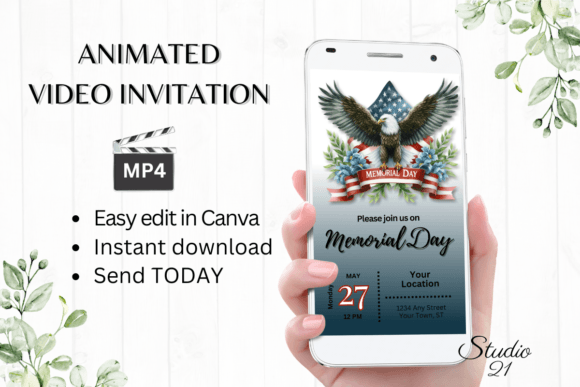
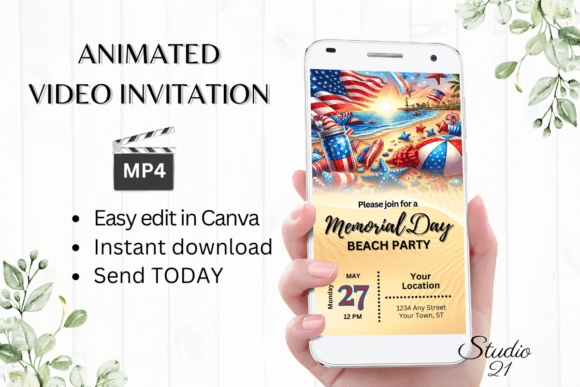
These templates are not static images. They are animated, editable Canva files that you download, personalize, and send as an MP4 video. You get a 1080 x 1920 pixel template, a PDF with the link, and instructions. No fonts to install, no software to buy, and no waiting for approvals. You edit in your browser or on your phone, change text, colors, animation, and effects, then share the finished invitation through text, Messenger, iMessage, WhatsApp, or email.
Understanding what this product actually offers, and whether it fits your specific situation, matters more than a list of features. Different people will care about different aspects of this template. Some need speed. Others need creative control. Some are inviting twenty people; others are organizing a larger community event. Let's walk through what this template does, who might find it useful, and how to decide if it matches what you actually need.
What the Memorial Day Beach Party Invitation Template Actually Does
At its core, this is a pre-designed animated video invitation that you customize in Canva. The template is built at 1080 x 1920 pixels, which is the standard vertical format for sharing on mobile devices. You receive a PDF with a link that opens the template in Canva's free editor. From there, you can change any text, add or remove elements, switch fonts, adjust colors, modify text effects, and change the animation style. Once you are satisfied, you download the final version as an MP4 file.
The key distinction here is that you are not learning video editing or graphic design from scratch. The structure is already set. You are making targeted edits to match your specific event details, your tone, and your personal style. Because the template is animated, the invitation feels dynamic when someone receives it on their phone. It moves, it catches attention, and it conveys a sense of occasion that a plain text message or a static image cannot match.
For beginners, this removes the intimidation of starting with a blank canvas. For experienced creators, it provides a reliable foundation that can be pushed further with custom branding or advanced Canva features. The same template serves both groups, but they will interact with it differently.
Beginners and Casual Hosts
If you are someone who does not design invitations regularly, your priority is likely speed and simplicity. You do not want to learn a new tool or spend hours tweaking details. The Memorial Day Beach Party Invitation template works well here because it requires no prior design experience. You open the link, click on the text fields, type your event details, and download. The animation is already set. The color palette is already cohesive. You can make basic edits on your smartphone while waiting in line or during a lunch break.
A practical example: You are hosting a small family beach gathering on Memorial Day weekend. You need to let ten people know the time, location, and what to bring. Instead of sending a plain text, you edit the template to say "Bring your own chair and a side dish," change the font to something casual, and send the MP4 via text. The whole process takes under ten minutes. The result looks polished, and your guests perceive the effort even though the actual work was minimal.
For this audience, the main evaluation criteria are ease of use, speed, and whether the final result looks intentional. The template passes on all three counts because the design work is already done.
Experienced Users and Creators
If you have used Canva before or have some design background, your relationship with this template will be different. You will see it as a starting point rather than a finished product. You may want to change the animation timing, adjust the color scheme to match your personal brand, or add your own photos or logos. The template allows for that because Canva's editor is flexible.
For example, a freelance event planner might use this template as a base and then add their business logo, change the background gradient, and insert a custom map graphic showing the beach location. The final MP4 still looks like a cohesive video invitation, but it carries the planner's professional identity. The template saves the planner the time of building the animation from scratch, while still leaving room for customization that matters to their business.
Experienced users will evaluate the template based on flexibility, quality of the base design, and whether the animation feels smooth and appropriate for the occasion. They will also notice whether the template scales well when edited heavily, and whether the fonts and colors hold up after changes.
Small Business Owners and Entrepreneurs
Business owners who run seasonal promotions, host client appreciation events, or organize community beach cleanups can use this invitation template as a marketing tool. The animated format works well for social media sharing, and the Memorial Day theme gives the event a clear seasonal hook.
A beachside café, for instance, could use the template to invite local customers to a Memorial Day opening party. The owner edits the invitation to include the café's name, a special menu offer, and a link to RSVP. The animated video gets posted on Instagram Stories and sent to the café's mailing list. The café gains visibility while also providing a clear call to action. The business value here is not just the invitation itself but the professional presentation that reflects well on the brand.
Business owners will prioritize commercial value, branding flexibility, and the ability to share across multiple platforms. They will also care about turnaround time because Memorial Day weekend is a fixed date, and delays are not an option.
Educators and Community Organizers
Teachers, club leaders, and nonprofit organizers often need to communicate event details to groups that include parents, volunteers, or community members. An animated invitation can cut through the noise of text-heavy emails and group chats.
For example, a school parent group organizing a Memorial Day beach cleanup can use the template to create a sense of occasion. They edit the invitation to include the cleanup start time, what supplies are provided, and a message about honoring the day through service. The animated format makes the announcement feel special, which can boost attendance. The organizer can share the MP4 in the school's parent Facebook group and through a text blast.
For this group, the evaluation criteria include clarity of information, ease of sharing, and whether the invitation feels appropriate for the event's tone. The template's casual beach theme fits a cleanup event well, and the animation adds visibility without being overly flashy.
Ease of Use
The template is designed to be edited immediately. You do not download software, install fonts, or wait for proofs. The link in the PDF opens the template directly in Canva's free editor. From there, every element is clickable and editable. If you have used any drag-and-drop tool before, the learning curve is negligible. If you have not, the included user guide walks you through the steps. The ability to edit on a smartphone makes it accessible even if you do not have a computer handy.
Quality and Presentation
The base design is built at 1080 x 1920 pixels, which is the standard for mobile-optimized video. The animation is pre-set, so you do not need to keyframe or adjust timing unless you want to. The colors and fonts are chosen to match a beach party theme. When you download the MP4, the resolution stays sharp because the template is vector-based within Canva. This matters if you are sharing the invitation in a group chat where image quality can vary.
Speed and Reliability
Because the template is digital and editable in real time, you can go from purchase to finished invitation in under thirty minutes, often faster. There is no shipping, no printing, and no proof approval cycle. If you need to update the date or time after sending, you can edit the template again and resend the updated MP4. This is a significant advantage over printed invitations, where changes require a reprint.
Flexibility and Creativity
While the template provides a strong starting point, the degree of customization depends on your comfort with Canva. You can change fonts, colors, text effects, and animation styles. You can add or remove text blocks. You can insert your own images or backgrounds. If you are a creator who wants to build a fully custom invitation, this template still saves you the foundational work. If you are a beginner who wants to change only the event details, that is equally supported.
Who Should Choose This Template
This Memorial Day Beach Party Invitation template works best for people who value time over total creative control. If you want a professional-looking animated invitation without learning animation software, this is a direct fit. It also works for people who need to share invitations across messaging apps where video performs better than static images.
If your event is formal, or if you need a physical printed invitation, this template may not be the right choice. It is designed for digital sharing, and while you could export a static PDF from Canva, the animated MP4 format is the primary deliverable. Similarly, if you want complete artistic freedom from a blank screen, a template will feel too restrictive. But for the vast majority of Memorial Day beach gatherings, the balance of quality, speed, and ease makes this template a practical solution.
Consider your own goals. If your priority is to send a polished invitation to friends, family, or customers quickly, and you want it to feel a cut above a plain text message, this template delivers that. If you enjoy the process of designing from scratch and have the time to do it, you may prefer a different approach. The product is transparent about what it offers: a pre-built, editable, animated invitation that you can send in minutes.
Long-Term Usefulness
Because the template lives in Canva, you can edit it at any time. If you host a similar event next year, you can duplicate the template and update the details rather than starting over. The same file can be repurposed for other beach-themed gatherings throughout the summer. For frequent hosts, small business owners, or community organizers, this means the template is not a one-use purchase. It becomes a reusable asset that saves time season after season.
The digital format also means you are not dealing with leftover printed invitations or worrying about running out. You send exactly as many as you need, and you can resend to anyone who missed the first message. This practical advantage is easy to overlook but becomes obvious when you compare it to printed alternatives.
Color variation across devices is a minor consideration, as noted in the product details. Different screens display colors slightly differently, and the same is true for any digital file. This is not a flaw specific to this template, but it is worth knowing if color accuracy is critical for your event branding.
Final Thoughts on Matching the Template to Your Needs
The Memorial Day Beach Party Invitation digital animated video template is a targeted tool. It solves a specific problem: creating a shareable, animated invitation quickly without design experience. It is not a universal solution for every event, but for beach gatherings on Memorial Day weekend, it aligns well with the casual, festive, and timely nature of the occasion.
When you evaluate whether this template fits, ask yourself what matters most for your event. If speed, ease, and mobile-friendly sharing top your list, this is a strong option. If you need full creative control or a physical printed product, look elsewhere. The template's value lies in its balance of professional quality and minimal effort, and that balance is exactly what many hosts, business owners, and organizers need during a busy holiday weekend.