Tulip Flower Dreamscape Background
When you’re building a brand, designing a social media campaign, or even crafting a personal project, the background you choose can make or break the entire composition. The Tulip Flower Dreamscape Background offers a rich, alcohol-ink aesthetic that captures vibrant florals with a modern, painterly feel. But many people jump to using these backgrounds without thinking about how they’ll work with text, other graphics, or the final output medium. Let’s walk through the practical side of working with these assets—what often goes wrong and how to get the results you actually want.
What the Tulip Flower Dreamscape Background Actually Offers
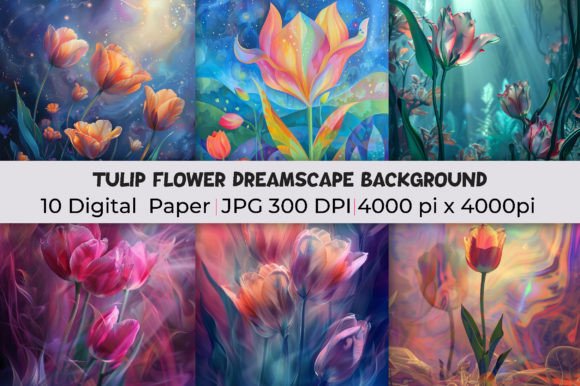
This collection is built around high-resolution JPG images at 4000 by 4000 pixels. That means you get ten separate backgrounds, each with unique swirls, blooms, and color washes that mimic luxury alcohol ink textures. The pink tones are prominent, but you’ll also find complementary warm and cool shades that work across different design styles. Because the files are large, they hold detail well, which matters if you’re printing large or using them as full-screen wallpaper in a presentation. But size alone isn’t enough—you need to understand how the texture and color intensity will behave once you place other design elements on top.
Mistaking High Resolution for Universal Usability
A 4000 by 4000 pixel image gives you flexibility, but it doesn’t mean every part of the frame will work in every layout. The mistake I see most often is cropping these backgrounds without first checking where the main visual interest lands. A flower cluster might sit right where you need to place a headline, forcing you to either cover the best part of the image or awkwardly reposition your text. Before you download, open the file and note the dominant areas of detail. If you know your text will sit in the lower third, look for a background where that area is softer or more open. You can always rotate or flip the image to shift the focus, but planning saves you from fighting the composition later.
Overlooking Color Cast and Print Accuracy
Luxury alcohol ink textures often have subtle shifts in hue—pinks that lean coral in one corner and closer to magenta in another. On a well-calibrated monitor, that looks intentional and beautiful. But when you send that same file to print or upload it to a web platform that applies its own color compression, those shifts can become muddy or oversaturated. A common workaround is to not check the background against your actual project palette early. Take one of the ten images, place a sample of your logo or primary color on top, and look at the interaction. If the background drowns out your main element, you may need to desaturate the background slightly or add a subtle overlay to create separation. A 10% opacity white or black layer often helps the background read as texture rather than competition.
Treating All Ten Images as Interchangeable
The collection includes ten unique JPGs, and they vary in density, intensity, and pattern. A busy background with tight floral detail works well for a decorative poster or a meditation app interface where you want the image to feel immersive. But the same background placed behind a product photo or a call-to-action button can make those elements hard to read. One designer I worked with used the most dramatic pink-heavy background for a professional brochure header. The text vanished, and the overall effect felt chaotic. The solution was simple: pick a background from the same set that had more negative space and softer color edges. The luxury feel remained, but the readability improved dramatically.
Practical Checks Before You Commit to a Background
- Test readability first. Place your smallest expected text size over the background. If it blends in at that size, it will be worse at larger sizes without proper contrast treatment. Use a drop shadow or semi-transparent shape behind the text if you must keep the busy background.
- Check file weight. A 4000x4000 JPG can be large, especially if you’re using multiple backgrounds in one project. Some platforms will compress your image automatically, which can make the alcohol ink gradients look pixelated or banded. Keep a backup copy at full resolution and, if possible, work in a format that supports layers so you can adjust opacity without re-downloading.
- Look at the mood. This collection leans into pink and warm tones. That’s perfect for feminine branding, wellness content, or artistic portfolios. But if your project needs a cooler or more neutral palette, you might end up color-correcting every image, which eats time and can degrade quality. Match the background’s inherent mood to your project before you buy. If the mood fits, you’ll save hours of adjustment.
- Consider the end use. A website background that loads on mobile needs to be optimized for smaller screens. The same file used as a desktop wallpaper might look stunning, but on a phone, the detail can get lost. Think about where your audience will see this. For digital, you may want to test a scaled-down version. For print, request a proof if possible, because alcohol ink textures can look different on coated vs. uncoated paper.
How to Avoid Wasting Time and Money on the Wrong Background
I’ve watched people buy a beautiful background collection and then struggle to make it work because they didn’t define what they needed first. Instead of starting with “this looks pretty,” start with a short checklist. What is the main purpose of the design? Where will it be seen? How much text or other content will sit on top? Then, and only then, preview the Tulip Flower Dreamscape Background against that brief. The ten images in this set are distinct enough that you can find one that fits your specific layout without heavy modification. If you need to heavily modify every image, you’re probably using the wrong style of background altogether.
Another practical step is to open the background in your design software before you purchase, if a preview is available. Many creators offer low-resolution watermarked previews. Use that preview to do a quick layout test. If the background works with your content even at low resolution, the full-size version will only improve the experience. If it feels awkward in the preview, moving to 4000 by 4000 pixels won’t fix the fundamental composition issue.
File Format Assumptions
These are JPG images, which means they don’t have a transparency layer. That’s fine for most uses, but if you want the background to sit over something else or to wrap around a subject, you’ll need to extract or mask areas yourself. JPG compression also means that solid color areas are not perfectly uniform—there’s subtle noise. That noise adds to the organic, alcohol-ink feel, but it can clash with vector graphics that are perfectly flat. If you’re mixing this background with sharp vector elements, consider adding a slight blur or texture to your vector assets so they feel part of the same world.
Expecting One Background to Work in Multiple Orientations
A square 4000 by 4000 image is versatile, but it won’t fit every aspect ratio without cropping. A horizontal banner will cut off top and bottom; a vertical flyer will cut off left and right. Decide your primary orientation before you choose which of the ten backgrounds to use. If you need both landscape and portrait versions, pick two backgrounds that can be cropped strategically rather than trying to stretch or distort one square image.
Forgetting That Backgrounds Affect Brand Consistency
If you’re using this collection for multiple projects, it’s easy to default to the same background repeatedly. That can make your work feel repetitive. On the other hand, using all ten backgrounds in one campaign without a unifying element can make the campaign feel disjointed. The sweet spot is to use two or three backgrounds from the set that share a similar depth and color family, then tie them together with consistent typography and graphic elements. This keeps the luxury alcohol ink texture as a signature style without overwhelming your audience.
Better Approaches for Designers, Freelancers, and Small Business Owners
If you’re a freelancer or small business owner, time is money. The smartest way to use a collection like this is to batch your design work. Open all ten images, sort them by busyness and dominant color, and label them for specific use cases—one for hero sections, one for quote graphics, one for product backgrounds. Once that library is set up, pulling the right background for a new project takes minutes instead of hours. I’ve seen this approach cut project prep time by nearly half.
For marketers and educators who use backgrounds in presentations or online courses, contrast is non-negotiable. The Tulip Flower Dreamscape Background can make a slide look elegant, but if you place text directly over the textured areas, your message gets lost. Use a solid-color bar—white, black, or a tint pulled from the background—behind your text. That keeps the artistic feel while preserving readability. You can also reduce the background’s opacity to 50 or 60 percent in your presentation software to let the texture exist without dominating the slide.
When to Step Back and Choose a Different Style
Not every project calls for a floral dreamscape. If your brand is minimalist or industrial, this collection might feel too ornate. That doesn’t mean it’s bad—it means it’s a mismatch. The most common regret I hear is buying a beautiful background set because it looks great as a standalone image, but it doesn’t support the content. A background should serve the message, not compete with it. If you find yourself constantly fighting to make the background work, honor your design goals and select a simpler option. There’s no shame in that. The right background makes your job easier.
Final Thoughts Before You Download
The Tulip Flower Dreamscape Background gives you ten unique, high-resolution canvases with a luxury alcohol ink feel. They can elevate everything from social media posts to print materials, but only if you use them with intention. Check your layout, test readability, account for print or screen differences, and match the background’s mood to your project. Avoid the common trap of treating all ten images as interchangeable or assuming high resolution guarantees a perfect fit. By taking a few minutes to preview and plan, you’ll get professional results without the frustration of rework. Download these backgrounds ready to adapt them to your specific vision—not the other way around.
When you approach it that way, you’re not just adding a texture. You’re making a deliberate design choice that supports your message and impresses your audience. That’s the difference between a background that fills space and a background that transforms a project.